Child Account:

Innovation at Your Fingertips

Wix doesn't just give you tools, it gives you a team. A comprehensive suite of AI agents to help you build, optimize, and grow your business without the overhead of an agency.

Wix ai powered tool

This is where the journey begins. Aria is the primary interface for everything visual.

Aria

The Lead Architect

Aria is the brains behind the beauty. She takes your vision from a single prompt to a fully structured, multi-page site. She doesn't just build; she stays with you as a collaborative partner, ready to pivot your brand's vibe at a moment's notice.

Aria ai builder

AI Section Creator

Adds and edits entire page sections. Describe a need, like a custom story slider, and watch the architecture appear.

Theme Assistant

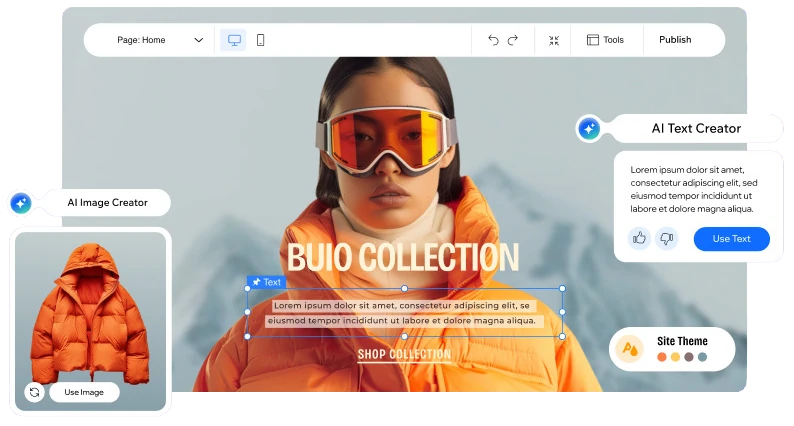
The master of aesthetics. Swap entire colour palettes and font pairings across the site in one click.

AI Portfolio Creator

Professional organization at scale. It clusters your media and suggests titles and descriptions for a polished gallery.

AI Text Creator

Generates high-conversion copy for all your pages.

AI Blog Content Creator

Drafts full, search-optimized posts with images and keywords tailored to your brand's voice.

Title Creator

Hooks your audience with punchy, AI-generated headlines and page titles.

AI Image Creator

Turns your ideas into bespoke, high-resolution original photography or art. If you can put it into words, Aria can create it.

Auto Background Remover

Instant subject isolation.

Object Eraser

Select and vanish unwanted elements.

Image Enhancer

Automatic clarity and resolution boost.

Extend Images

Intelligently expands framing.

Upscale Resolution

Pro-grade quality for low-res assets.

Meet your team of specialists, 4 distinct agents designed to grow your business and keep it running at optimal performance.


Assigned Functions

  • Marketing Strategy
    She builds bespoke plans to fit your specific business goals.
  • Content Creation
    Kleo handles the generation and scheduling of blog posts and social media updates.
  • Automation
    She manages the heavy lifting for SEO, email campaigns, and paid advertising.
  • Performance Tracking
    She monitors engagement and offers suggestions to improve your results.

Kleo identifies the 'where' and 'how' of your next big win.

Assigned Functions

  • Inbox Management
    She sorts through incoming messages to ensure the most urgent ones get your attention first.
  • Customer Service
    Juno drafts replies that match your brand's voice for your final review.
  • Actionable Insights
    She spots trends in customer data, such as uncollected payments, and prompts you to send pay links or coupons.

Juno closes the gap between an inquiry and a loyal customer.

Assigned Functions

  • Custom Task Automation
    They can be taught to handle niche responsibilities like inventory tracking or booking management.
  • Routine Operations
    Omni takes over repetitive tasks, including report generation and sending follow-up emails.

Omni handles the logistics so you can focus on the vision.

Assigned Functions

  • Dashboard Management
    He helps you navigate settings and manage various apps or tools through simple conversation.
  • Data-Driven Insights
    Astro monitors sales trends and website traffic to help you find growth opportunities.
  • Content & Expansion
    He assists with adding new products, managing subscriptions, or exploring dropshipping options.
  • Operational Tasks
    He organizes back-office requirements, such as inviting new collaborators or assigning user roles.

Astro turns "What happened?" into "Here's what to do next."

The Intelligence Engine

This is your central command for the technical heavy lifting.

ACTIVE MODULE 01 / 10 PRODUCT_DESCRIPTIONS

High-Conversion Copy.

Generates unique, compelling descriptions for your store items from just a few key details. Move customers from browsing to buying instantly.

Ready to put the squad to work?

The most advanced AI in web development is standing by. Whether you are building from scratch or optimizing for growth, your agents are ready to execute your vision with precision and speed.

View Plans & Pricing

Ready to see the business engine in action? Next, explore the wired-in power of Wix’s Business Tools.


Frequently Asked Questions

Building your website with Aria starts with a conversation. After creating a Wix site through Webnames, you can choose to begin with Aria, Wix’s built-in AI agent, instead of selecting a template. Aria will ask a few questions about your business, goals, and design preferences, then generate a complete site foundation for you within Wix Harmony.

Once your site is generated, you're never locked into what Aria creates. You can adjust layouts, edit content, or ask Aria to add new sections at any point, all while using the same drag-and-drop editor. With Harmony, AI-generated changes apply only to the elements you choose, so the rest of your site stays exactly as it is while you refine and build.

You can publish your site when you're ready, continue making changes over time, and upgrade your plan whenever you want to unlock features like custom domains or online payments.


The marketing suite includes features like:

  • Lead Capture Forms: This tool allows users to create different kinds of forms like quizzes, registration forms, and job applications.
  • Automated Marketing Tools: These automation tools allow you to d things like send automated emails and chat messages, create tasks, notify teammates, and more.
  • Chat: This allows an open, direct channel of communication between business owners and their site visitors. Both the design and settings of the Wix Chat can be customized.
  • Inbox that allows you to view and respond to messages from many different channels like the chat, forms and social media pages. (Note: social media accounts are accessed through app integrations.)
  • Built-in SEO Tools
  • Google Business Profile Integration
  • Social Media Tools that allow you to create posts and publish them across platforms.
  • Coupons and Discounts
  • Marketing integrations like Google Analytics, Facebook Pixel, CAPI, Google Tag Manager, and others.

Wix offers a robust suite of built-in tools, including powerful AI features, to help you optimize your website and improve your visibility in search engine results and AI Overviews.

Foundational Steps:

  • Conduct keyword search by identifying words and phrases that people are searching for when looking for websites like yours. Use these keywords throughout your website’s content, including page titles, meta descriptions, and body text.
  • Publish high-quality content that is valuable to your audience. Use relevant keywords and incorporate them naturally into your content.

Harnessing AI for SEO Authority:

Wix's AI tools simplify complex optimization tasks and helps you generate high-quality, relevant metadata.

  • AI Meta Tags Creator: This tool automatically presents three optimized suggestions for title tags and meta descriptions based on your existing page content. You can further refine and tweak these suggestions to perfectly match your desired keywords.
  • AI Text Creator: Use AI to generate fresh, compelling, and SEO-friendly text for your website content. This ensures your content is high-quality, valuable to your audience, and naturally incorporates relevant keywords.

Using Built-In Optimization Tools:

Wix provides essential features for fundamental, on-page SEO.

  • Custom Page Settings: Ensure you use unique and descriptive page titles and meta descriptions for each page of your website. These snippets accurately reflect your content and appear in search engine results.
  • Header Tags: Use head tags (H1, H2, H3, etc.) to structure your content and make it easier for search engines to understand the hierarchy of your information.
  • Image Optimization: Use descriptive filenames and Alt Text for all your images. This helps search engines understand your visuals and improves your website’s overall visibility.
  • Internal Linking: Link to other relevant pages within your website to help search engines understand the structure and hierarchy of your content.

Monitoring Performance with the Site Inspection Tool:

The Wix Site Inspection Tool allows you to see how search engines view your pages and is crucial for identifying and fixing technical issues.

  • Running an Inspection: You can generate a report for any page on your site to see its current indexing status and check for issues.
  • Understanding the Report: The report provides detailed insights, including Indexing Status, any Site Errors found, and a Page Content Analysis to ensure you’re following best practices. This allows you to track your performance and make necessary adjustments to your SEO strategy.
  • Submitting a Sitemap: Submitting your sitemap to Google Search Console (which Wix helps you do) ensures that search engines can easily crawl and index all of your website’s pages.

By following these steps and leveraging Wix's cutting-edge AI features, you can significantly improve your website's visibility in search results and ensure your content is structured for optimal display in AI Overviews.


Yes, you can use the dictate option to speak your request instead of typing it. When you chat with Aria, you can also use voice mode to have a more natural back-and-forth conversation.


Yes, go to your site or relevant workspace in the app and tap AI Chats at the bottom to open the chat panel.


Your chat history is only visible to you. Each site collaborator can only see their own history.


To being using the agents, you need to onboard and configure them from the dashboard. This is where you connect the right tools (e.g. marketing channels or integrations), set goals, and review or adjust the agent’s ongoing activity. Aria is ready to use right away, but the other agents need to be set up on their own pages before they can start working for you.

Once they’re onboarded, you can use the chat to ask questions, initiate tasks, and review the agent’s activities. These actions may vary depending on the agent’s capabilities.


Each agent has its own specialty in managing your site and business

  • Aria is best for questions about your site, content, and setup.
  • Kleo is best for planning and improving your marketing.
  • Juno is best for managing and improving customer engagement.
  • Omni is best for automating ongoing or repetitive business tasks.

{{domainHosting.data.name}}
Selected

* about free domain names included in hosting plans.

* about free domain names included in Wix Website Builder plans.

Close
Sign In to Your Account
Don't have an account? Sign up now
Forgot password
or sign in with