SPF
In today’s email security landscape, Sender Policy Framework (SPF) is a foundational tool for protecting your domain from spoofing and improving email deliverability. SPF works by specifying which mail servers are authorized to send email on behalf of your domain.
When a recipient receives an email claiming to be from your domain, their mail server checks your domain’s SPF record to verify whether the sending server is allowed. If the check fails, the message may be flagged as suspicious or rejected entirely.
Benefits of SPF
- Reduces the risk of email spoofing and phishing
- Improves email deliverability and trust
- Helps comply with modern email authentication standards
How SPF Works
SPF uses a DNS TXT record to list the IP addresses or hostnames of servers permitted to send email for your domain. This record is publicly accessible and checked by receiving mail servers during email delivery.
For example, an SPF record might look like this:
v=spf1 a:spf10.webnames.ca -all
This record tells recipients to accept email from servers listed in spf10.webnames.ca and reject all others.
Managing SPF for your domain
Our SPF management tool simplifies the process of creating and updating your SPF record:
Automatic Configuration: If you use Webnames for both email services and DNS services, then the SPF record will be automatically applied, and SPF is enabled on your domain's email.
Manual Configuration: If your DNS is hosted by a third-party provider, then the required SPF record needs to be applied manually at that third-party provider. Please see the following article for the complete set of DNS records that are required in this situation: Email and Self-Managed DNS
Using Multiple Email Providers
In addition to Webnames email services, additional sending services (e.g., CRM platforms, marketing tools) can also be utilized in combination, however your SPF record must be updated to account for all these sources ensure those emails are properly authenticated.
Despite using more than one email service, your domain should have only one SPF TXT record. If multiple SPF records exist, they may conflict and cause authentication failures.
SPF Record Management
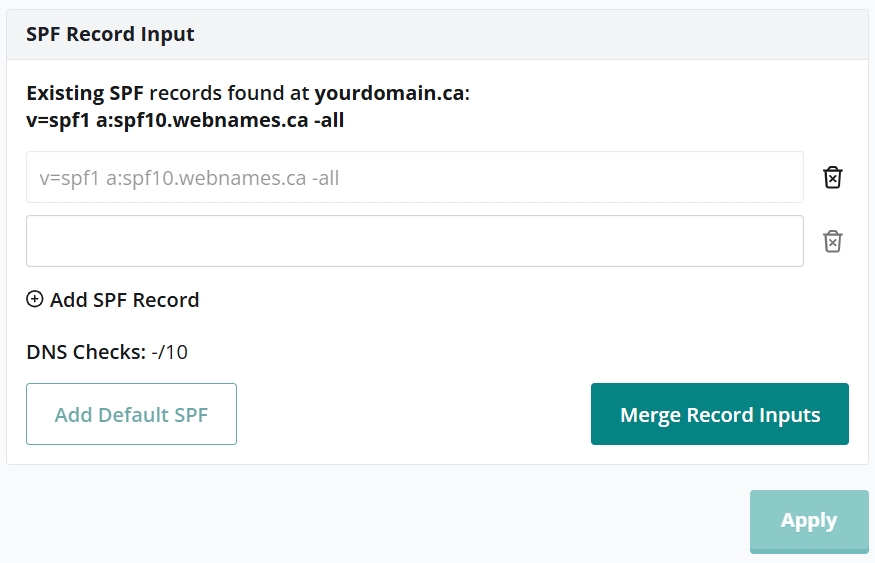
We provide an SPF record merge tool to properly combine the records from multiple providers into a single properly formatted record. Access to this tool can be found in your Webnames.ca account, on the Email tab of your domain's management interface.
Before using our SPF record merge tool, visit the help section of each of your email service providers to obtain their individual SPF records. Optionally, you can typically also perform a web search for "[your service provider's name] SPF" to obtain the same information.
Next, click the link below to access the domain(s) that have Webnames.ca email services, and if necessary click on the specific domain you'd like manage SPF for.
- CLICK HERE TO ACCESS YOUR WEBNAMES.CA EMAIL SERVICES
- Click the Email tab, and click the Manage button under Manage Accounts and Settings.
- Click SPF in the left margin.
- Using the fields provided, paste the individual SPF records of each of your domain's email service providers.
- Click Merge Record Inputs to combine each individual record in a single record.
- Follow the additional instruction presented on screen to apply this merged record to your domain.
Important Notes
DNS Propagation: After updating your SPF record, changes may take up to 4–6 hours to propagate across the internet.
SPF Alone Isn’t Enough: SPF works best when combined with DKIM and DMARC to provide layered protection and reporting.