DNSSEC
Watch the video tutorial
DNSSEC DNSSEC is designed to protect applications (and caching resolvers serving those applications) from using forged or manipulated DNS data, such as that created by DNS cache poisoning. All answers from DNSSEC protected zones are digitally signed. By checking the digital signature, a DNS resolver is able to check if the information is identical (i.e. unmodified and complete) to the information published by the zone owner and served on an authoritative DNS server. is the extension of the DNS The Domain Name System (DNS) is a hierarchical distributed naming system for computers, services, or any resource connected to the Internet or a private network. It associates various information with domain names assigned to each of the participating entities. A Domain Name Service resolves queries for these names into IP addresses for the purpose of locating computer services and devices worldwide. By providing a worldwide, distributed keyword-based redirection service, the Domain Name System is an essential component of the functionality of the Internet. protocol that allows signing DNS data
in order to secure the domain name resolving process. For general
information about DNSSEC and its usage, visit ICANN
website
and https://tools.ietf.org/html/rfc6781.
DNSSEC is designed to protect applications (and caching resolvers serving those applications) from using forged or manipulated DNS data, such as that created by DNS cache poisoning. All answers from DNSSEC protected zones are digitally signed. By checking the digital signature, a DNS resolver is able to check if the information is identical (i.e. unmodified and complete) to the information published by the zone owner and served on an authoritative DNS server. is the extension of the DNS The Domain Name System (DNS) is a hierarchical distributed naming system for computers, services, or any resource connected to the Internet or a private network. It associates various information with domain names assigned to each of the participating entities. A Domain Name Service resolves queries for these names into IP addresses for the purpose of locating computer services and devices worldwide. By providing a worldwide, distributed keyword-based redirection service, the Domain Name System is an essential component of the functionality of the Internet. protocol that allows signing DNS data
in order to secure the domain name resolving process. For general
information about DNSSEC and its usage, visit ICANN
website
and https://tools.ietf.org/html/rfc6781.
You can do the following to protect DNS data of your domains with DNSSEC:
- Sign and unsign domain zones according to DNSSEC specifications
- (Optionally) Specify custom settings to be used for generation of keys
- Receive notifications
- View and copy DS resource records
- View and copy DNSKEY resource record sets.
Signing a Domain Zone
To start using DNSSEC protection of your DNS zone, sign this zone. Plesk Plesk Panel is the preferred choice for hosting service providers, web designers, and website owners. Plesk Obsidian 18 is the latest release from Plesk and offers a range of new benefits and features for every user type.
signs the zone with an automatically generated signatures using two
pairs of asymmetric keys, the Key Signing Key (KSK) and the Zone Signing
Key (ZSK).
To sign a domain zone:
- Select the domain in Websites & Domains.
- Go to DNSSEC and click Sign the DNS Zone.
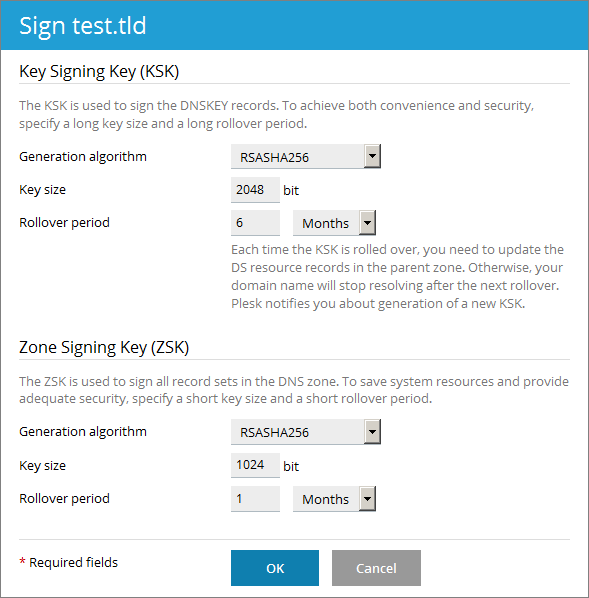
- If the zone has never been signed before, Plesk prompts you to
generate the keys that will be used to create a signature.
You can use the default values or specify custom values. See Recommended Values below.
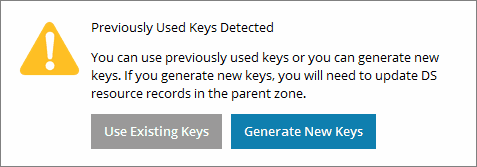
- If you previously signed the DNS zone, you have the choice to use
previously generated keys or generate new ones. If you opt for new
keys, you can either use the default values or specify custom values.
See Recommended Values below.
Recommended values of KSK and ZSK generation settings:
- A long key and a long rollover period for the KSK.
- Every time the Key Signing Key is updated, you need to update the DS records in the parent zone. The recommended values help you to update DS records as seldom as possible without decreasing security.
- A shorter key and a shorter rollover period for the ZSK.
The Zone Signing Key is updated automatically. The recommended values help you to save system resources without decreasing security.
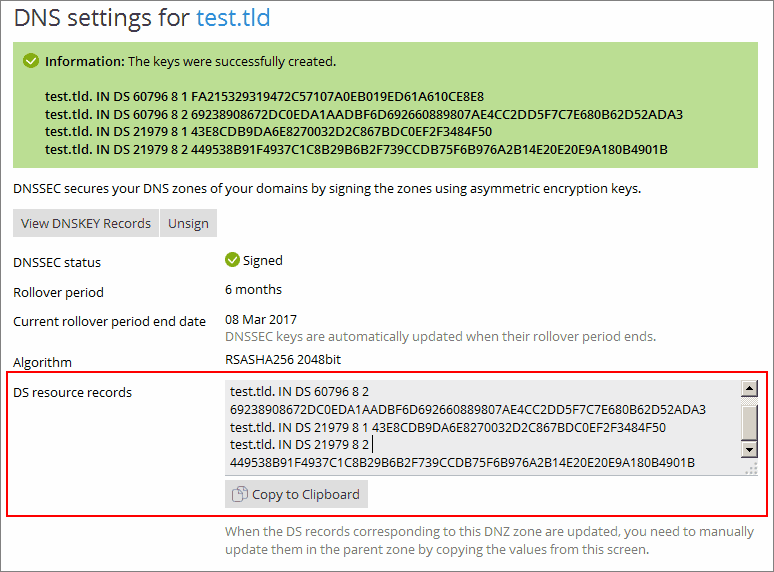
- In the end of the signing procedure, Plesk displays DS records, which
contain hashes of the Key Signing Keys used for signing the zone.
These records must then be uploaded to the domain's respective domain registry, which for domains registered with Webnames.ca, via your Webnames.ca account. See the next section for instructions


Updating the DS Records at the Domain Registry
- Log into your Webnames.ca account
- Using the top menu, click on Account then under Domains, click Manage Domains.
- Click on the domain name you wish to configure from the list.
- Click on the DNSSEC tab.
- Under Delegation Signer (DS) Records, enter the following:
- Keytag
- Five digits after "DS"
- Algorithm
- RSA/SHA-256
- Digest Type
- SHA-256
- Digest (Hash)
- Long string to text and numbers at the end of the provided record in Plesk
- Keytag
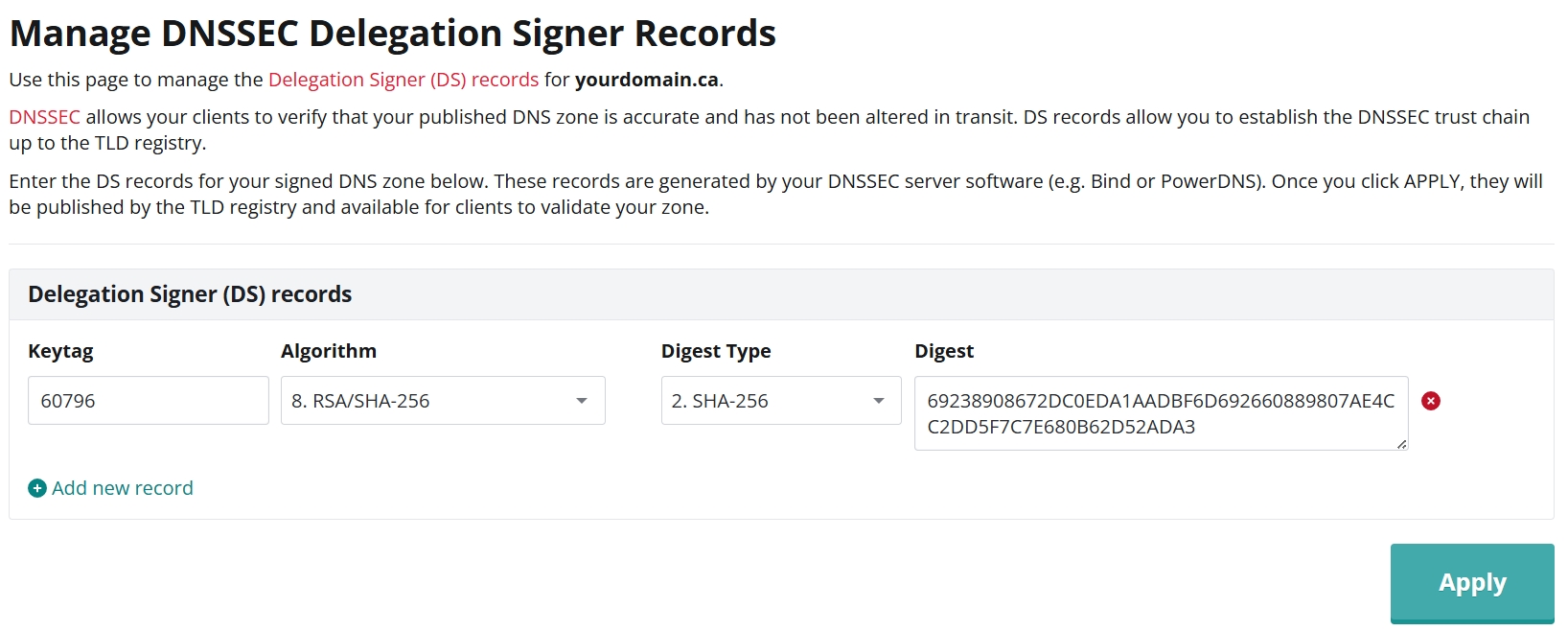
- Click Add new record to add additional DS Records as needed
- Click Apply
Unsigning a Domain Zone
Unsigning a domain zone turns off DNSSEC protection for that zone. You may need to unsign a zone if the keys were compromised, and then sign the zone again using new keys.
To unsign a domain zone:
- Go to Websites & Domains > select a domain > DNSSEC and click Unsign.
- Delete the DS resource records from the parent zone. Otherwise, the domain will not resolve.
Note: When you unsign a zone, the keys are not deleted from Plesk. You can sign the zone again using the same keys.
Viewing DNSKEY Resource Records
You might need to retrieve DNSKEY resource records, which contain public parts of Key Signing Keys used by a domain.
To display DNSKEY records:
- Go to Websites & Domains > select a domain > DNSSEC.
- Click View DNSKEY Records.